Centralized control for every position
Monitor devices, queues, displays, content, price lists, inventory and alerts from one operating panel, even when endpoints are not inside a store.
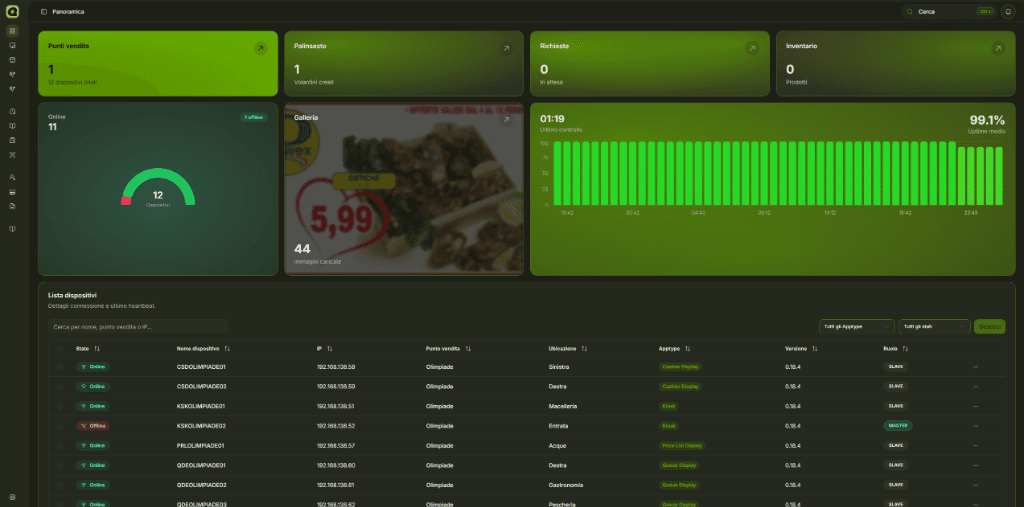
A central command flow, not a feature list
The dashboard structures work by layers: network health first, then device control, then content, operational data and technical tools.
Monitor distributed positions
One view for sites, departments, stations, devices and distributed installations.
Control device health
Kiosks, displays, price boards and services online, offline or degraded with immediate anomaly alerts.
Sync content and data
Schedules, media, messages, price lists, ingredient books and inventory data distributed remotely.
First, see what is happening
The operating view puts live status, positions, incidents, uptime, pairing requests and sync state first, so intervention starts from the real issue.
Network and live status
Dashboard overview, polling, realtime stream, heartbeat, uptime snapshots, online/offline/degraded/unknown state, last connection, IP, latency, software version and incident summary.
Device management
Search, filters, sorting, device details, remote database, app restart, app update, console open or close, Explorer actions, bulk commands, controlled deletion and provisioning through link requests.
Then act on devices
Each endpoint can be searched, filtered, opened in detail and checked by status, app type, IP, position, cluster role and installed version.
Remote actions when needed
App restart, update, console logs, Explorer, remote database, system commands and bulk actions remain available to authorized users.
Content and data have their own workflow
Schedules, price lists, inventory, ingredient books and messages are not secondary: they are separate operating modules built to keep distributed device information consistent.
Messages and communications
Scrolling messages for one or more places, targets for all displays, queue only or cashier only, active/inactive state, date and time scheduling, priority, expiration, group editing and deletion.
Schedules and media
Manual flyers, image and video gallery, transmission windows, calendar, priority, active/paused/archived status, upcoming transmissions and automatic promotions generated from inventory.
Price lists and products
Sortable pages, drag-and-drop products, EAN, names, quantities, prices, offers, promo dates, brands, logos, categories, types, 3x2, discounts, detail price, euro/liter and auto-fill.
Inventory and SMB sync
DAT imports, product catalog, general inventory, per-position inventory, SMB configuration, connection test, position import, product lookup, price variations, last sync and controlled clearing.
Ingredient book
PDF uploads by department and position, multi-file drag and drop, file queue, duplicate checks, existing file updates, downloads, single or bulk deletion and distribution to authorized devices.
Diagnostics, security and integrations stay traceable
Technical capabilities live in a separate layer: APIs, logs, incidents, roles, cron jobs, analytics and branding stay visible without mixing into daily content operations.
Incidents and alerts
Offline incidents, printer errors, missing master, severity, reminders, recovery, notification deduplication, daily report, Discord alerts, SMTP email, server logs and client telemetry.
Operational APIs
Endpoints for device APIs, schedule, pricelist, ingredient book, scrolling messages, inventory, heartbeat, logs, database, system actions, restart, API Tool and proxy calls to online devices.
Users and access
NextAuth, database sessions, password change, password reset, users, DEV/SUPPORT/ADMIN/EDITOR/VIEWER roles, auditable permission matrix and secret-protected cron jobs.
Queue analytics
Queue snapshots on the analytics database, estimated waits, issued and serving numbers, departments, time slots, dedicated cron jobs and operational reports connected to monitored positions.
Branding and preferences
Theme, visual presets, layout, logo, branding upload, sidebar, breadcrumbs, search, notifications, account area and UI components aligned with the operating environment.
Book a guided walkthrough on your real setup
We start from the positions, devices and workflows you need to control to recommend the right operating model.
Request a demo